CapturasScreenshots
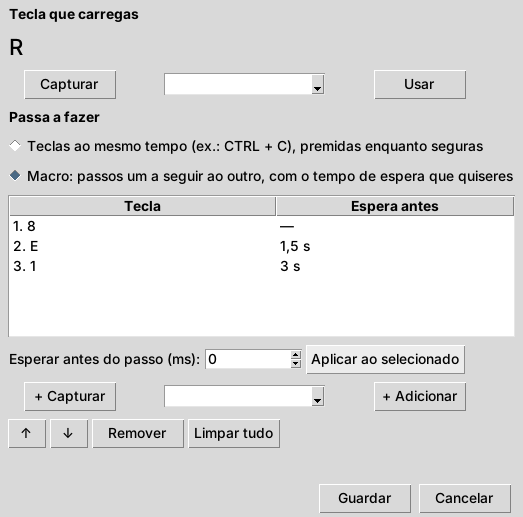
Uma janela para ver os atalhos e outra para os criar. Clica numa imagem para a ampliar.One window to see your shortcuts and another to create them. Click an image to enlarge it.
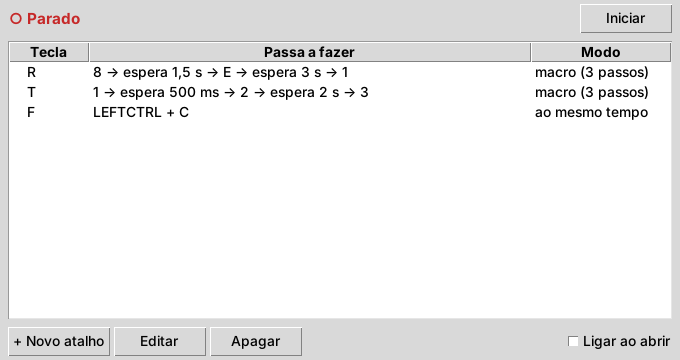
O KB Macro troca uma tecla física por outra, por várias ao mesmo tempo ou por uma macro com o tempo de espera que escolheres. Funciona em qualquer programa ou jogo.KB Macro turns a physical key into another key, several keys at once or a macro with the waits you choose. It works in any program or game.
Leve, sem configurações escondidas e sem depender do ambiente gráfico.Lightweight, no hidden settings and no dependence on the desktop environment.
Trabalha ao nível do kernel, por isso funciona em X11, Wayland, na consola e dentro de jogos.It works at kernel level, so it runs on X11, Wayland, the console and inside games.
Quantos passos quiseres, cada um com a sua espera antes. 1000 ms = 1 segundo.As many steps as you want, each with its own wait before it. 1000 ms = 1 second.
Carrega várias teclas juntas e mantém-nas premidas enquanto seguras a tua tecla.Presses several keys together and holds them while you hold your key.
Carregas em Capturar e depois na tecla. Ou escolhes da lista com todas as teclas do Linux, incluindo multimédia e botões de comando.Click Capturar and then press the key. Or pick from the list with every Linux key, including media keys and controller buttons.
Com --run remapeia sem janela e recarrega sozinho quando mudas os atalhos.With --run it remaps without a window and reloads by itself when you change the shortcuts.
Os atalhos ficam num ficheiro simples que podes editar à mão ou copiar para outro PC.Shortcuts live in a simple file you can edit by hand or copy to another PC.
Cada atalho escolhe o que a tecla passa a fazer.Each shortcut chooses what the key does.
As teclas ficam premidas enquanto seguras a tua. Bom para atalhos ou para andar num jogo.The keys stay pressed while you hold yours. Good for shortcuts or for moving in a game.
Passos um a seguir ao outro, com o tempo de espera que quiseres antes de cada um.Steps one after another, with the wait you want before each one.
Uma janela para ver os atalhos e outra para os criar. Clica numa imagem para a ampliar.One window to see your shortcuts and another to create them. Click an image to enlarge it.
Funciona em Arch, Debian/Ubuntu, Fedora e openSUSE. O script instala o python-evdev e o tk e dá ao teu utilizador acesso ao teclado.Works on Arch, Debian/Ubuntu, Fedora and openSUSE. The script installs python-evdev and tk and gives your user access to the keyboard.
git clone https://github.com/Ribeiro-MD/KB-Macro.git cd KB-Macro
./install.sh # ou: ./install.sh --autostart
Com --autostart o remapeamento liga sozinho quando entras na sessão.With --autostart remapping turns on by itself when you log in.
É preciso para o grupo input contar. Depois abre o KeyBinds no menu ou corre ./keybinds.py.This is needed for the input group to take effect. Then open KeyBinds from the menu or run ./keybinds.py.
Criar um atalho demora uns segundos.Creating a shortcut takes a few seconds.
Fica em ~/.config/keybinds/config.json. Em waits vai a espera em ms antes de cada tecla.It lives in ~/.config/keybinds/config.json. waits holds the wait in ms before each key.
{
"autostart": true,
"mappings": [
{"from": "R", "to": ["LEFTCTRL", "C"], "mode": "combo"},
{"from": "T", "to": ["8", "E", "1"],
"mode": "sequence", "waits": [0, 1500, 3000]}
]
}
Sem janela, a recarregar sozinho quando o ficheiro muda:No window, reloading by itself when the file changes:
./keybinds.py --run
O que costuma aparecer.What usually comes up.
Lê os teclados em /dev/input com evdev, agarra-os e reenvia tudo por um teclado virtual em /dev/uinput, trocando só as teclas que configuraste.It reads the keyboards in /dev/input with evdev, grabs them and resends everything through a virtual keyboard in /dev/uinput, swapping only the keys you configured.
Para o programa poder ler o teclado sem correr como root. É o mesmo que pedem outros remapeadores como o keyd ou o input-remapper.So the program can read the keyboard without running as root. Other remappers like keyd or input-remapper ask for the same.
Fecha o KB Macro (ou Ctrl+C no modo --run) e o teclado volta ao normal.Close KB Macro (or Ctrl+C in --run mode) and the keyboard goes back to normal.
Confirma que correste o install.sh e que terminaste a sessão depois. Podes ver com groups se o input aparece.Check that you ran install.sh and logged out afterwards. Run groups to see if input shows up.
Não, é só para Linux.No, it is Linux only.